
M999 Game Review: What “Earning A Million A Month” Actually Means Inside The App
02/09/2026
7.5MB
1.4.4
Android
450
Description
Most bonus claims inside apps like this show up as banners. Big graphics, a headline figure, some gift box artwork.
M999 does that too, plenty of times. But the most striking claim we found was not a banner at all.
It was sitting inside the Profile menu, under Invite, as a small subtitle. It read Earning A Million A Month.
No banner. No artwork. Just a permanent label attached to a normal navigation item.
Before covering M999 Register, M999 Login, the M999 APK, or M999 Withdrawal, that line deserves a closer look. It’s easy to scroll past without noticing.
Table of Contents
A Bold Claim Sitting Inside the Profile Menu, Not a Banner
Banners are clearly promotional. Users expect them to oversell.
A subtitle inside a settings style menu reads differently. It sits next to labels like Manage Withdrawal and Security Center, in the same plain text.
That gives it a kind of borrowed credibility a flashy banner doesn’t have.
Earning A Million A Month has no qualifier nearby. No up to, no some users, no terms apply.
Nothing in the menu explains how that figure was calculated. Whether it’s one exceptional case or a realistic outcome is not stated anywhere.
We couldn’t verify this during testing, since that would mean running an active referral campaign for a full month. Treat it as an unverified marketing line, not a realistic expectation.
If you’re relying on M999 Game’s referral feature as more than occasional extra credit, ask Customer Service what data backs that number.
Why the Placement Matters More Than the Number
Plenty of platforms make bold earning claims somewhere in their marketing. A million a month isn’t even an unusual figure in this space.
What’s different here is where the claim lives. A banner invites skepticism by design.
A menu subtitle borrows the neutral tone of the rest of the app instead. That framing shift is worth noticing, on any platform, not just this one.
M999 Game at a Glance
| Detail | What We Found |
|---|---|
| Platform Name | M999 |
| Registration Method | Mobile number and password |
| Login Method | Registered mobile number or username with password |
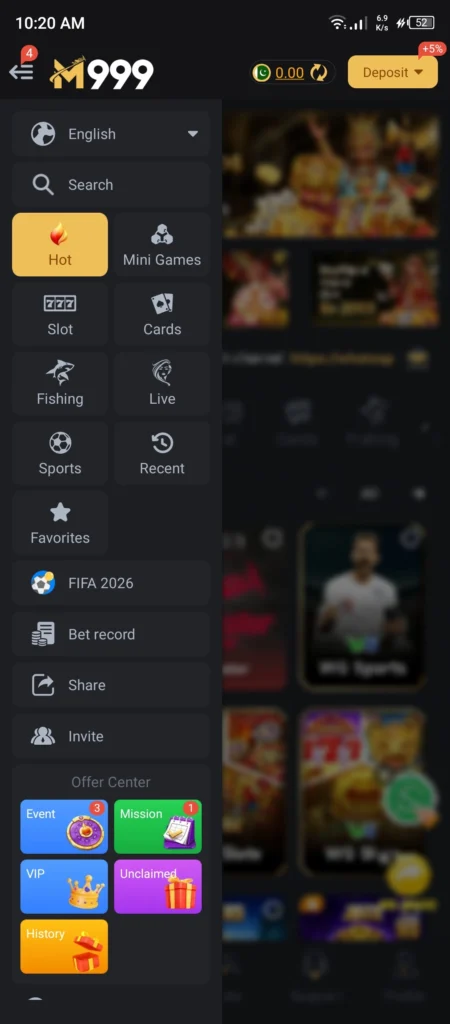
| Deposit Bonus | Plus 5 percent shown directly on the Deposit button |
| Payment Methods | JazzCash and Easypaisa |
| Game Categories | Hot, Mini Games, Slot, Cards, Fishing, Live, Sports, Recent, Favorites |
| Unverified Claims Found | Earning A Million A Month subtitle, plus a Grand Prize Record ticker showing multi million rupee wins |
Getting the M999 APK Installed
M999 Game is downloaded directly rather than through the Play Store, so the M999 APK is your only real install path. We didn’t capture the download screen this session, so the steps below reflect the standard flow used by comparable apps.
- Download the M999 APK from the official source only
- Allow installation from unknown sources if prompted
- Open the app once installed
- Proceed to M999 Register or M999 Login
Avoid links shared through WhatsApp or social media. A modified file can behave differently from the real one.
What the Install Screen Should Tell You
Whatever source you download from, the Android install prompt is your last checkpoint before the app lands on your phone. Check the app name shown there against what you expect.
Look at the permissions requested too. A gaming app asking for access to contacts, SMS, or call logs without a clear reason is worth pausing over before tapping Install.
M999 Register and M999 Login, Step by Step
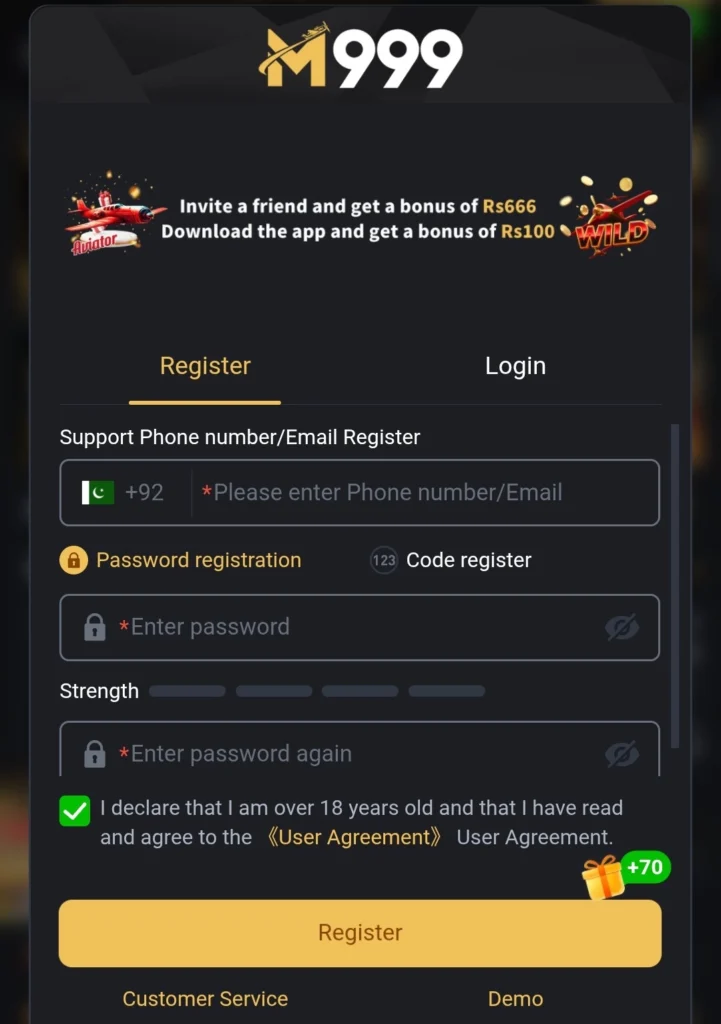
Creating an M999 Game account needs a mobile number and a password. No separate email option, based on what we saw.
M999 Register
- Open the app and select Register
- Enter your mobile number
- Create a password, ideally not reused elsewhere
- Complete any verification step shown
- Submit to finish registration
M999 Login
- Open the app and tap Login
- Enter your registered mobile number or username
- Enter your password carefully
- Complete verification if prompted
- Tap Login to reach your dashboard
If M999 Login fails, check for extra spaces in your number field on the M999 Register screen. That’s the most common mistake on phone based platforms.
The Floating 666H Widget That Follows You Everywhere
The same small overlay appeared across the Hot tab, the Cards tab, and the Fishing tab. It reads 666H and partly covers the game tiles under it.
Each one has an X to dismiss it. It reappears in the next tab anyway.
This behaves more like a persistent shortcut than a one time promo message. It’s not entirely clear what 666H refers to, separate from the platform’s other Rs 666 branded offers shown elsewhere.
Sitting on top of game artwork across multiple tabs makes it feel more intrusive than a normal banner confined to one screen.
A Small Detail, But a Telling One
On its own, a persistent overlay you can’t fully dismiss is a minor annoyance. Plenty of apps have small interface quirks like this.
What makes it worth mentioning here is the pattern it fits into. Between the 666H overlay, the repeated Rs 666 figure in two separate banners, and the unverified subtitle under Invite, M999 Game shows a habit of blurring the line between what’s clearly promotional and what’s just part of the interface.
None of these individually would be a major concern. Together, they’re worth keeping in mind while you use the app.
Three Aviator Tiles, One Familiar Pattern
The Hot tab shows three separate Aviator tiles. One under WG, one under an unbranded orange logo, one under Spribe.
All three run the identical rising multiplier format.
We documented the same pattern on a different platform in our Bet55 Game Login review. Three Aviator tiles there created the impression of a bigger library than what actually exists.
Seeing the same structure here suggests this is a wider pattern across apps in this category, not something specific to one platform.
Browsing the Rest of the Game Library
Cards
The Cards tab showed JILI Cards, WG Cards, KingMidas Cards, MW Cards, and HB Cards. Five distinct provider badges, wider than several platforms we’ve tested.
Fishing
Fishing included JILI Fishing, WG Fishing, JDB Fishing, FC Fishing, YellowBat Fishing, and MG Fishing. Six different provider names in this category alone.
Live and Sports
Live featured Evo Live, Sexy Live, and PP Live. Sports showed 9Wickets Sports, IM Sports, and FB Sports, covering cricket and football tiles.
What the Provider Spread Actually Tells You
A wide list of provider badges looks impressive at first glance. It’s worth remembering that most of these providers supply the same style of game to multiple platforms.
JILI, WG, and JDB titles show up across nearly every app we’ve reviewed in this category. Seeing them again on M999 isn’t a mark against the platform, but it isn’t a unique selling point either.
What actually varies between platforms is the wrapper around those games, deposit terms, withdrawal rules, and how honestly the bonus banners are labeled. That’s where the real differences between apps in this space tend to show up.
Two Different Offers, One Repeated Number
Inside the Event tab, a Weekly Share banner promises Rs 666. A separate Invitation Bonus banner, labeled Recommendation Bonus, also promises Rs 666.
These are presented as two distinct offers. Yet they carry the identical figure.
Nothing in the interface explains whether this is intentional, a coincidence, or two labels describing the same underlying reward.
The Event tab also showed a Daily Share reward of Rs 300, a Monthly Share reward of Rs 10,000, and a separate Invite A Friend banner promising Rs 2,000. Add the homepage’s Rs 5,000 Mission Rewards banner, and that’s six distinct promotional figures across two screens, before even counting the 666H overlay.
The Recent Winners Ticker Nobody Can Verify
Scroll to the bottom of the Sports tab and a Grand Prize Record section shows recent wins tied to partly masked usernames. During our session, that included figures around Rs 7,000K, Rs 1,216K, Rs 1,645K, and Rs 3,009K.
Right beside them sits a Share M999 To Earn Rs 666 prompt.
Displays like this act as social proof, showing new users that big payouts happen often. There’s no way to check any of these figures from inside the app, no transaction ID, no timestamp beyond the scrolling animation, no link to a verifiable record.
Treat this section like any testimonial you can’t check. It tells you what the platform wants you to believe, not what actually happened.
Our TR2026 Game review covers a similar jackpot banner promising a million rupee prize pool. Same caution applies there.
How to Read a Winners Ticker Like This One
A few questions help cut through displays like this. Does it show a full username, or just a partly masked one that could belong to anyone?
Is there a date or transaction ID, or just a rotating list with no way to look further back? Can you find the same win mentioned anywhere outside the app itself?
If the answer to all three is no, the ticker is doing its job as marketing. It just isn’t doing the job of proof.
M999 Withdrawal, What the Menu Shows
The Profile screen lists Withdraw and Deposit as the two main wallet actions. My Records covers details, records, reports, and balance recovery, while Manage Withdrawal handles payout accounts separately.
What a Withdrawal Request Generally Involves
- Open Withdraw from the Profile screen
- Confirm your linked account under Manage Withdrawal
- Enter the amount you want to withdraw
- Submit and monitor My Records for status updates
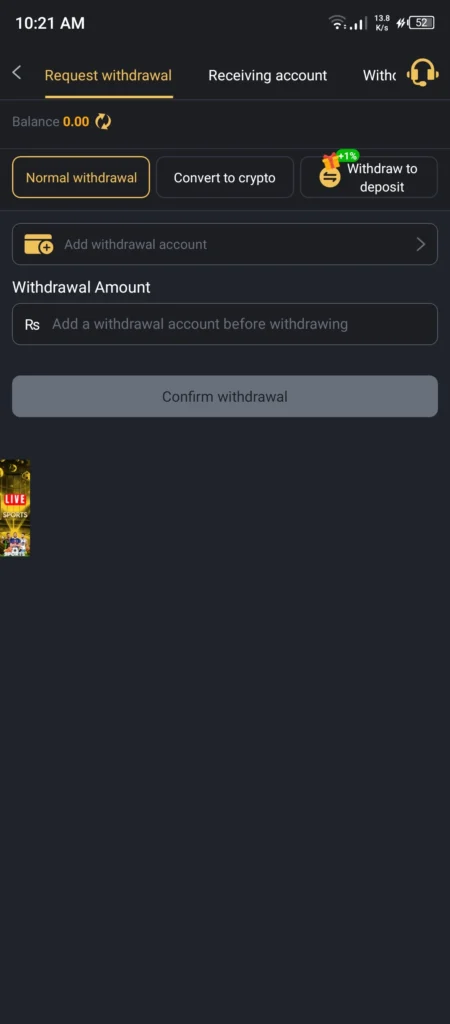
We didn’t capture a turnover requirement or processing time on the withdrawal screen itself. This detail has been missing across other platforms too, including our 44 PK Game review, so confirming it through Customer Service before a larger deposit is a reasonable habit regardless of the app.
Strengths and Weak Points
Where M999 Game Holds Up
- Wide provider spread across Cards and Fishing
- Deposit bonus percentage shown directly on the Deposit button, not buried in a submenu
- My Records consolidates transaction history and balance recovery in one place
- Familiar registration and login flow using only a mobile number
Where We Would Slow Down
- An unverified Earning A Million A Month claim sits as a plain menu subtitle, not a marked promotion
- A persistent 666H overlay reappears across multiple tabs, covering game artwork
- Weekly Share and Invitation Bonus banners both advertise the same Rs 666 figure with no explanation
- Six or more distinct promotional figures across the homepage and Event tab combined
- A Grand Prize Record ticker shows multi million rupee wins with no way to verify any of them
- Three Aviator tiles under different provider badges inflate the apparent Hot tab library
A Simple Test Before Trusting Any Big Number Here
Whether it’s the Million A Month subtitle, the Grand Prize Record ticker, or one of the six promo banners, the same test applies. Can the figure be traced to something you can check, or does it only exist inside the app?
M999 Register and M999 Login get you into the platform. They don’t give you a way to audit any of these numbers yourself.
Until that changes, enjoy the games on offer without letting a single headline figure decide how much you deposit.
Where That Leaves M999
M999 Game offers a fairly complete package. Wide provider spread in Cards and Fishing, a visible deposit bonus, a consolidated records section.
What stands out most is how an unverified income claim made its way into a functional menu label, sitting next to a recent winners ticker that can’t be checked and a referral figure that repeats across two differently named offers.
If you explore M999 Game, treat the Million A Month line and the Grand Prize Record figures as unverified marketing, not realistic expectations. Read the specific terms behind any bonus before claiming it, and set a firm budget regardless of which figure looks most convincing.
Frequently Asked Questions
What does the Earning A Million A Month label under Invite actually mean?
It’s an unverified claim shown as a subtitle in the Profile menu next to Invite. Our testing couldn’t confirm what percentage of users, if any, reach this figure.
How do I complete M999 Register?
You need a mobile number, a password, and any requested verification step before your account becomes active.
How do I complete M999 Login?
Enter your registered mobile number or username along with your password on the Login screen.
Is the M999 APK available outside the Play Store?
Yes. It’s a direct APK download, so verifying the official source before installing matters more than with a store listed app.
Why do two M999 promo banners show the same Rs 666 figure?
The Weekly Share reward and the Invitation Bonus Recommendation reward both advertised Rs 666 during our testing, with no explanation of whether they’re related.
Can I trust the Grand Prize Record win amounts?
There’s no way to independently verify the figures shown in that ticker. Treat them as unverifiable social proof, not confirmed evidence.
How does M999 Withdrawal work?
Submit requests through Withdraw on the Profile screen. Linked payment accounts are managed separately under Manage Withdrawal.
What is the floating 666H overlay that keeps appearing?
A recurring widget across the Hot, Cards, and Fishing tabs. Dismissible with an X, but it reappears on the next tab, and its exact purpose isn’t clearly labeled.
Disclaimer
This review is written for informational purposes only. RozgarApps is not the developer or operator of M999. This page contains a referral link, and RozgarApps may earn a commission if you sign up through it, at no extra cost to you. All bonus figures, payment methods, and features mentioned reflect what was visible during our testing and can change at any time. Online gambling involves financial risk, and no outcome is guaranteed. Please play responsibly and only with money you can afford to lose. To Learn more visit our Disclaimer page.
Who Tested This
RozgarApps Team covers earning apps and gaming platforms for Pakistani users, focusing on registration flows, deposit mechanics, and bonus terms as they actually appear inside each app, not just what the marketing pages claim. Every review is built from a real account created on the platform, using current screenshots taken during testing.
Email: contact@rozgarapps.com.pk
Last verified: September 1, 2026
Download links
How to Download the App?
1. Tap the downloaded button.
2. Redirection will take you to the game page.
3. Locate the download button there.
4. Sometimes users have to register first to get the download option.
5. Click the download button, and the download will start.